






Microsoft 365 Email Encryption Guide


.avif)

Microsoft 365 already includes the tools to protect sensitive email. For most businesses, switching it on properly is a short project with a long return.
Most businesses send sensitive information by email every day. Contracts, invoices, payroll details, client records, board papers, employee disciplinaries. Almost all of it leaves the building in plain text, sits in recipients' inboxes indefinitely, and can be forwarded onwards without anyone knowing.
The interesting part is that most Microsoft 365 licences already include the tools to lock that down. The reason it isn't switched on usually comes down to nobody having got round to it.
Email encryption is one of those controls that quietly does a lot of work in the background. When it's set up properly, sensitive messages can be restricted to named recipients, blocked from forwarding, expired after a set time, or wrapped in a sensitivity label that travels with the content. None of that requires an expensive new platform. For most businesses, it requires turning on what they're already paying for.
How email encryption works
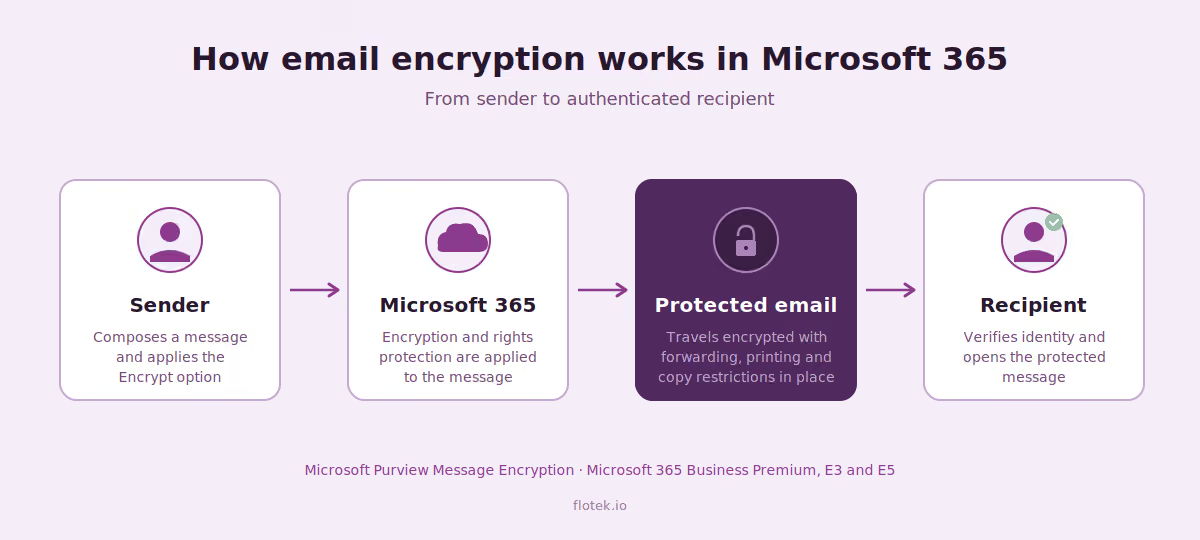
From the sender's compose window, through Microsoft 365's encryption layer, to a recipient who has to verify before reading. The diagram below shows the journey at a glance.
What licence you actually need
The most relevant licence for SMEs is Microsoft 365 Business Premium. It includes Microsoft Purview Message Encryption, sensitivity labels, and the underlying rights management service that makes encryption portable across devices and platforms. That covers everything most small and mid-sized organisations need to send protected mail externally and internally.
Larger organisations on enterprise Microsoft 365 licences are also well covered. Microsoft 365 E3 includes the same core encryption capabilities, and E5 adds more advanced features like automatic labelling, deeper data loss prevention, and richer audit. If you're on Business Basic, Business Standard, or an Exchange-only plan, the capability isn't included by default and you'll need to add it on or move up.
What it looks like to send
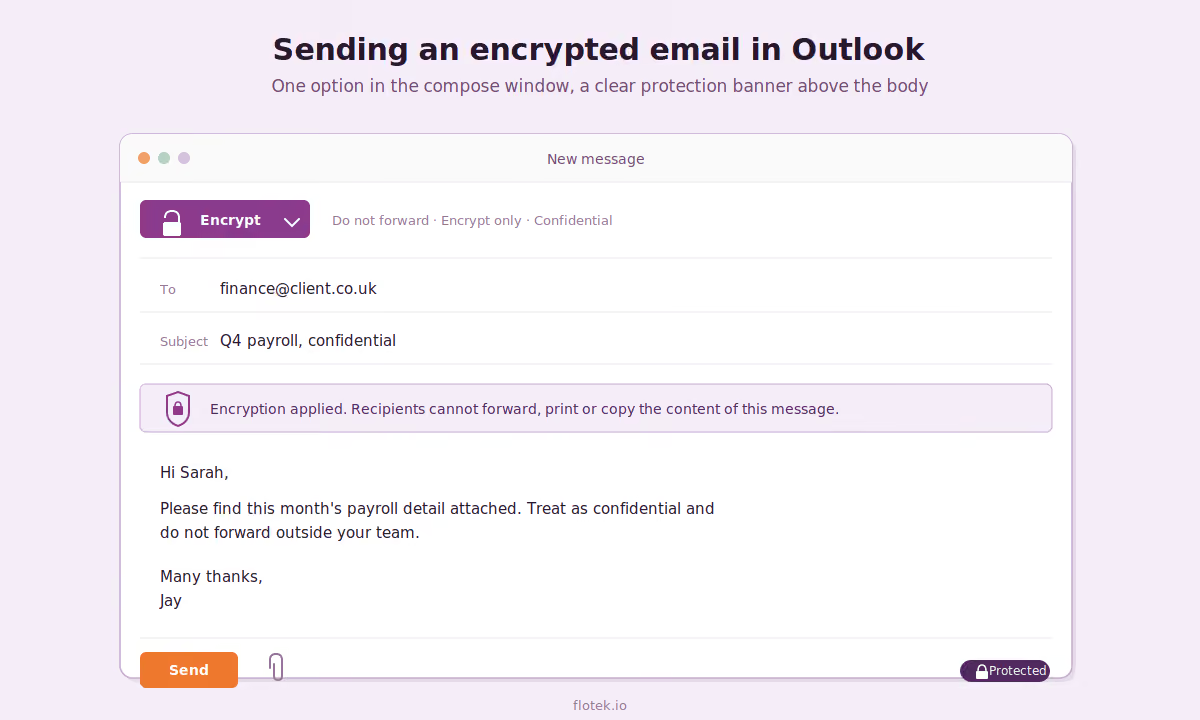
For the sender, encryption is one option in the compose window. A short banner makes it clear that the message is protected and that recipients cannot forward, print or copy the content.
Why you should turn it on
The case for switching it on isn't theoretical. Most businesses can think of email exchanges in the last month where encryption would have been the obvious answer. Five common ones we see in practice:
- Payroll and finance changes. A finance team sending payroll updates, bank details or pay rises to internal recipients, where the message being forwarded to the wrong person creates a real problem.
- Legal and compliance work. A legal or compliance team sharing draft contracts, settlement details or privileged advice with clients and counterparties who shouldn't be able to forward it on.
- HR matters. An HR team sending grievance, disciplinary or termination paperwork that needs to stay tightly scoped to the parties involved.
- Board and commercial communication. A leadership team circulating board papers, commercial figures or M&A discussions where forwarding controls and expiry dates matter.
- GDPR-sensitive client data. A client services team sending personal data covered by GDPR, where unencrypted email is the kind of detail an ICO investigation tends to focus on.
In all five, the protection lives with the message itself, not just with the inbox it arrived in.
How long it takes to set up
Enabling the underlying capability is quick. Configuring it properly is the project.
For most businesses, a sensible rollout includes confirming licensing coverage, enabling and configuring the rights management service, building mail flow rules for the most common scenarios, defining sensitivity labels, agreeing who can apply what, and giving users a short, plain-English guide to using it. It usually also means a conversation with compliance, legal and finance about what should be protected by default. None of that is complicated on its own, but it adds up to a project rather than a switch, and skipping the setup work tends to lead to either too much encryption or none at all.
For most SMEs, this is the kind of work that sits naturally with your existing managed IT support arrangement as a one-off project, where it can be scoped, scheduled and owned end to end.
Which sectors get the most out of it
Anyone handling regulated, privileged or commercially sensitive information has a strong case. Two sectors stand out.
- Legal firms deal with privileged communication, client identity documents, conveyancing funds, court bundles and settlement terms. The SRA and the wider regulatory environment expect this material to be handled properly, and the reputational cost of a misdirected email in a legal setting is significant.
- Accountancy and finance practices handle tax records, payroll, management accounts, bank details, HMRC correspondence and audit material. The combination of high-value data and high client trust makes encryption an easy call, particularly where firms exchange information with clients who don't have the same controls in place at their end.
Beyond those two, the same logic applies to healthcare, financial services, recruitment, property and conveyancing, insurance, and any business handling significant volumes of personal or commercial data.
What happens when you don't have it
Email without encryption is essentially a postcard. Anyone in the delivery chain can read it, and once it lands, the recipient has full control. They can forward it, screenshot it, leave it in an unsecured inbox, or sync it to a personal device. If the account is later breached, every sensitive message ever sent to or from it is exposed.
The practical consequences usually fall into four areas. Regulatory exposure under GDPR, where unencrypted personal data is a recurring theme in ICO action. Contractual exposure, where client and supplier agreements increasingly require encryption in transit and at rest. Commercial exposure, where sensitive deals, pricing or strategy ends up where it shouldn't. And reputational exposure, which tends to be the one that hurts longest.
All four are why email encryption sits inside any sensible cyber security plan rather than being treated as a standalone tick-box.
Worth doing properly
Email encryption isn't a flashy control. It doesn't get the attention that endpoint protection or identity does. But it's one of the most useful things a Microsoft 365 tenant can be doing quietly in the background, and for most businesses it's already paid for. Switching it on properly is a short project with a long return.
If you'd like a hand looking at how email encryption could work across your Microsoft 365 environment, get in touch with the team.
Watch how it works
For a clear walkthrough of how email encryption looks from both the sender's and the recipient's side, we recommend this short video covering setup and licence requirements:
Microsoft 365 Email Encryption Setup & License Requirements: Encrypted Email From Outlook in O365
Further reading
Microsoft Copilot Cowork: features, licensing and GDPR considerations — what to know before rolling out the latest layer of Microsoft 365 Copilot.
Microsoft Copilot in Outlook: practical uses for email, priority and calendar — getting more out of the AI capability already inside Microsoft 365.
Flotek partners with Check Point for email security — enterprise-grade email protection against phishing and impersonation.
Flotek Cyber Security Solutions — the full range of security services available to our partners.





.jpg)








Schedule a Free IT Audit & Cost Breakdown


Download ‘Your First 60 Days with Microsoft Copilot’ Guide



%20amended%20logo.avif)




.avif)
.avif)
%20(1).avif)
.avif)