






%20(19).avif)
Microsoft Teams Phone + Shifts Integration
.avif)


.avif)

Empower Your Team with Smarter Scheduling and Seamless Call Management
Ever wished your phone system could keep up with your team’s shift schedule—automatically? Now it can.
What is Microsoft Shifts?
Microsoft Shifts is a scheduling tool built right into Microsoft Teams. It’s perfect for businesses that run on shifts—think customer service desks, retail stores, or field teams. Managers can create and share schedules, and employees can clock in, swap shifts, and stay on top of their work hours—all from the Teams app.
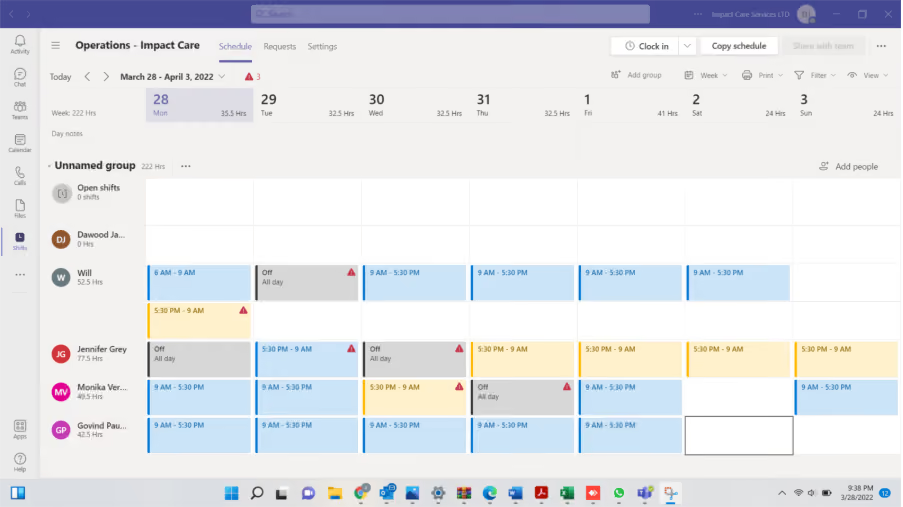
The New Integration: Teams Phone + Shifts
Here’s the game-changer: Microsoft has introduced an integration between Teams Phone and Shifts. This means when someone starts their shift, they’re automatically added to the inbound call queue. When their shift ends, they’re removed.
No more manual updates. No more missed calls because someone forgot to log in or out. Your call routing now works in sync with your team’s schedule.
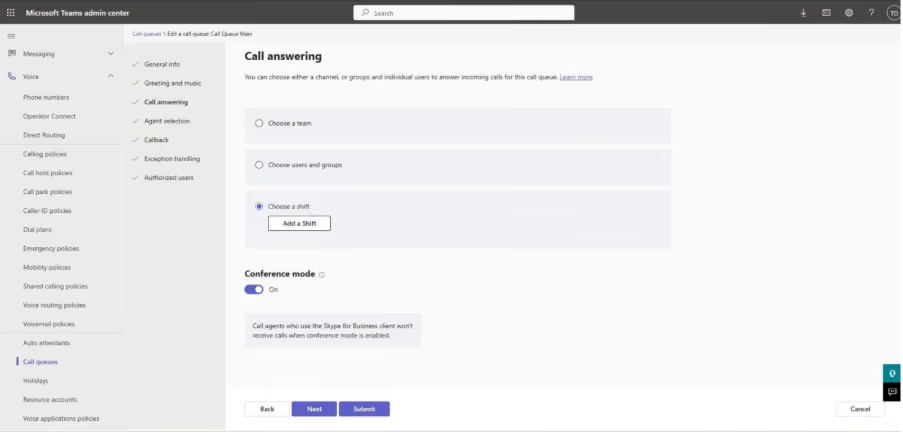
Why Does This Matter?
- Smarter Call Handling: Only available staff receive calls.
- Less Admin Work: No need to manually manage call queues.
- Better Customer Experience: Calls go to the right people, at the right time.
What About Delays?
You might notice a short delay—sometimes up to 15 minutes—when someone joins or leaves a shift before the call queue updates. This is mainly due to the synchronisation delay within the Graph API that Microsoft uses to manage these changes. The good news? Microsoft is continually improving this integration, so you can expect these updates to become faster over time as the underlying technology evolves.
Ready to Give Teams a Voice?
If you’re looking to improve your communications and make Teams your all-in-one hub, this integration is a big step forward.
👉 Download our new brochure here
👉 Or speak to us today about how Teams Phone can transform your business.





.jpg)







Schedule a Free IT Audit & Cost Breakdown

Download ‘Your First 60 Days with Microsoft Copilot’ Guide




%20amended%20logo.avif)







.avif)
.avif)
%20(1).avif)
.avif)